
Nol Card Balance Check 2026: Check Online, Recharge and Fix Pending Balance
27-Jul-2026 0 Comments 1000 Views
Priyanshu Raghav
Quick Answer
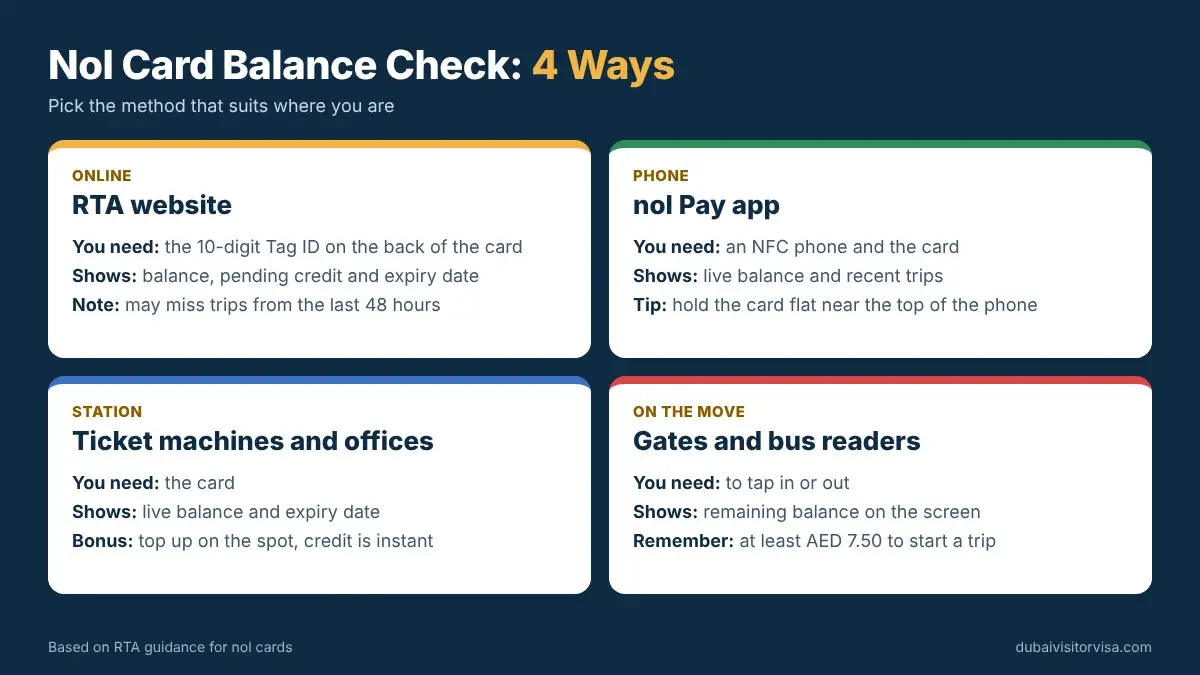
You can run a Nol card balance check in under a minute through the official RTA website, the nol Pay app, or any Metro ticket machine. Most methods ask for the Nol Tag ID — a 10-digit number printed on the back of the card — rather than your name or payment details. Keep at least AED 7.50 on the card before you travel, since Dubai Metro gates and bus readers reject cards below that line with no warning. Online top-ups usually need 45 minutes to 4 hours and a tap at a gate, parking meter, or top-up machine before the credit is usable.
Check Nol Card BalanceOpens the official RTA website in a new tab. DubaiVisitorVisa.com does not access, store, or display live Nol card balances.
[Featured image placeholder — filename: nol-card-balance-check-online-2026.webp · ALT: "Nol card balance check guide showing Tag ID, online recharge, pending balance, minimum balance and expiry" · to be supplied by design team, no real card number]
A Nol card balance check tells you how much travel credit is left on your card before you tap into the Dubai Metro , a bus, the tram, or a water bus. This guide covers the current ways to check your balance online and on mobile, where to find the Nol Tag ID, how to recharge safely, what to do if a top-up is not showing, the minimum balance you need to travel, expiry rules, and which Nol card suits your trip. Card prices, recharge processing times and app features can change, so treat the balance shown by RTA's own system as the final word on what you actually have.
At a Glance
- Check online at the official RTA website, in the nol Pay app, or at any Metro ticket machine — no separate account is required for a basic Tag ID lookup.
- Online top-ups show as pending until you tap the card at a Metro gate, nol Pay app, solar top-up machine, or parking meter.
- Minimum travel balance is AED 7.50; a low balance is the most common reason a card is rejected at the gate.
- Planning which stations and fare zones you'll actually travel through? Our Dubai Metro map guide covers every Red and Green Line station, current timings, and the full fare table.
- RTA is mid-way through a system-wide upgrade to account-based ticketing, rolling out in phases through early 2027 — see the note near the bottom of this guide.
Check Your Nol Card Balance Online
The fastest online route is the official RTA website. It returns your available balance, any pending credit, and the card's expiry date without you needing to visit a station.
- Open the official RTA nol balance-check service at rta.ae .
- Locate the Nol Tag ID printed on the back of your card (see the next section if you can't find it).
- Enter the number exactly as printed, with no spaces.
- Complete any verification step shown on the page, such as a captcha.
- Select the balance-check option and submit.
- Review your available balance and expiry date.
- Check pending credit separately if the page displays it — this is money you've paid but not yet activated on the card.
Security note: Enter your Nol card details only on the official RTA website or the official nol Pay app. Never share payment credentials, app passwords, or your Tag ID in public comments, forums, or chat groups. This site does not ask for or store your card number.
A genuine RTA balance check will show a real-time figure pulled from RTA's own system. Treat any third-party site that displays an instant balance without redirecting you to RTA, or that asks for your card PIN, with caution — the RTA Nol card balance check should only ever run on RTA's own platform or app.
Where Is the Nol Tag ID?
The Nol Tag ID is the identifier most balance and recharge services ask for. On current Silver, Gold, and Personal (Blue) cards it is a 10-digit number printed on the back of the card, separate from any other reference number that may also appear on the plastic. Because RTA has updated its balance-check interface over the years, the exact label and digit count requested can vary slightly between the website, the app, and older articles online — always follow the field label and digit count shown by whichever official service you're using, rather than a number you remember from a different source.
[Image placeholder — filename: nol-card-tag-id-location.webp · ALT: "Nol card back showing the printed Tag ID area used for balance and recharge checks" · shows front and back of a sample card with blurred digits and an arrow to the Tag ID area; no real card number]
If the printed number is faded or scratched, hold the card at an angle under bright light and check both the front and back — some cards repeat a reference number in more than one place. If the Tag ID is genuinely unreadable, an RTA ticket office or Customer Happiness Centre can look up the card using the physical card itself, since the chip inside still carries its own identifier even when the printed digits are worn away.
Ways to Check Nol Card Balance
Official RTA Website
Enter the Nol Tag ID on RTA's balance-check page. No account is required for a basic lookup, and the result includes your balance, pending credit, and expiry date.
nol Pay App
RTA's dedicated card-management app. On supported Android and Samsung devices you can scan the physical card using your phone's NFC reader to pull the balance directly from the chip; you can also look up a card by entering its Tag ID inside the app.
RTA Dubai App / S'hail
The RTA Dubai app bundles nol card balance and NFC recharge alongside parking, Salik, and licensing services. S'hail focuses on journey planning across Dubai's transport network. Check the current app listing for the exact nol features available, since app functionality is updated periodically.
Metro Ticket Vending Machine
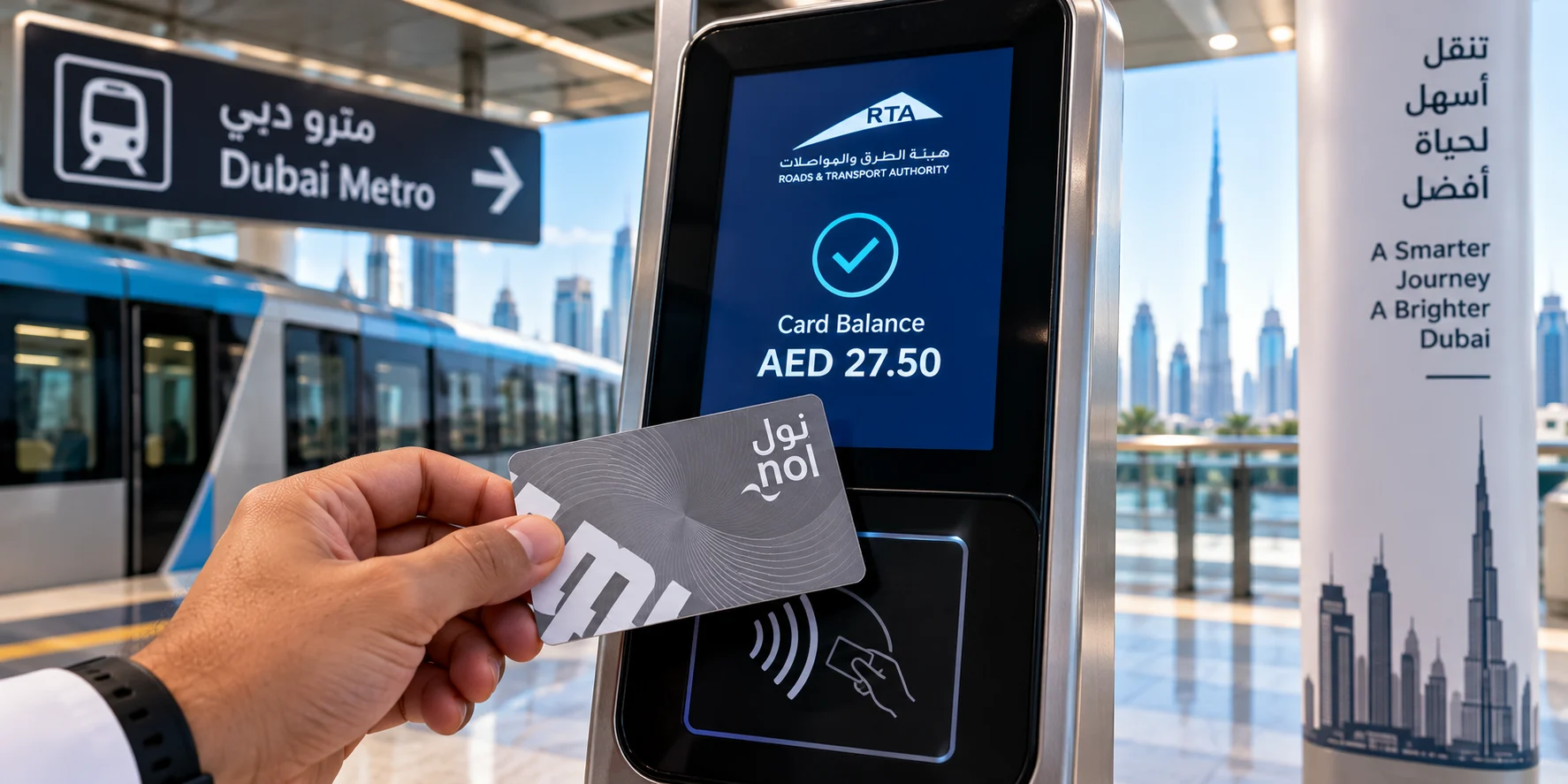
Place the card on the reader at any Metro ticket machine and select the balance or card-information option to see the amount on screen.
Metro Ticket Office
Staff at any ticket office counter can check your balance for you if you're already at a station and prefer an assisted process.
| Method | What You Need | Account Required | NFC Required | Best For |
|---|---|---|---|---|
| RTA website | 10-digit Nol Tag ID | No | No | Quick check from home before you leave |
| nol Pay app | Physical card (NFC) or Tag ID | Optional for basic use | Optional | Commuters who top up often |
| RTA Dubai app | Tag ID or linked card | Recommended | Optional | Users managing parking, Salik and nol together |
| Ticket vending machine | Physical card | No | No (contact reader) | Checking on the spot at a station |
| Ticket office | Physical card | No | No | Assisted check or unreadable card |
Planning Your Dubai Trip?
Apply for your Dubai visa online or contact the Dubai Visitor Visa support team through WhatsApp or email for application and document assistance.
Visa approval, processing time, boarding and entry remain subject to UAE immigration authorities and the applicant's circumstances.
How to Check Nol Card Balance on Mobile
From a phone, you can either open the RTA website in your mobile browser and enter the Tag ID exactly as you would on a desktop, or use the nol Pay app for an NFC-based check. To scan the physical card, enable NFC in your phone settings, remove any thick case that might block the signal, open the nol Pay app, and hold the card flat against the back of the phone until the app confirms a read. Not every phone model supports NFC card scanning in the same way, and support can differ between iPhone and Android devices, so if a scan fails, entering the Tag ID manually inside the app or on the website is the more reliable fallback. A balance check simply displays what's on the card; it does not add credit or activate a pending top-up on its own.
Can You Check Nol Balance Without an Account?
Yes, for a basic lookup. Entering your Tag ID on the RTA website or at a ticket machine does not require you to register an account. Checking at a ticket office is also account-free, since staff look up the card directly. Some features go further than a simple balance check — things like saved cards, downloadable transaction statements, or managing several family members' cards in one place — and those typically do require signing in. If you only need to know what's left on the card before a trip, you can do that anonymously.
Nol Card Recharge Online
Online top-ups can be made through the RTA website, the RTA Dubai app, or the nol Pay app. The general process is the same across channels.
- Select a supported recharge channel (website, RTA Dubai app, or nol Pay app).
- Enter your Nol Tag ID or scan the card by NFC where supported.
- Choose the recharge amount.
- Confirm you've selected the correct card before paying — this matters, since a top-up sent to the wrong Tag ID is hard to reverse.
- Pay securely with a debit or credit card.
- Save or screenshot the payment receipt.
- Allow the standard processing window before the credit shows as available rather than pending.
- Activate the pending amount by tapping the card at a Metro gate, in the nol Pay app, at a solar top-up machine, or at a parking meter.
- Recheck the balance to confirm the top-up has moved from pending to available.
Important: Paying online does not always put money on the card instantly. RTA's own guidance is that a fresh online top-up needs to be activated by tapping the card at a supported point — the payment confirmation is not the same thing as an activated travel balance.
Nol Card Recharge Methods Compared
| Recharge Method | How the Card Is Identified | Activation Needed | Typical Availability | Main Limitation |
|---|---|---|---|---|
| nol Pay app (NFC) | Physical card tap | Usually activates on the same tap that recharges it | 24/7, NFC-enabled phones | Depends on phone/device NFC support |
| RTA website / RTA Dubai app | Nol Tag ID | Yes — tap at a gate, meter, or top-up machine | 24/7 | Not usable until activated |
| Metro ticket vending machine | Physical card, inserted/tapped | Typically instant at the machine | Metro station operating hours | Requires being at a station |
| Metro ticket office | Physical card | Instant, assisted | Station hours, minimum top-up applies | Counter queues at peak times |
| Solar top-up machine | Physical card, tapped | Instant; also activates pending online credit | Select bus stops only | Not present at every stop, cash only at many units |
| Authorised retail agent | Physical card | Typically instant | Selected supermarkets, convenience stores and petrol stations | Not every outlet supports every card type |
The Red Ticket is the exception across every method above — as a single-use paper product it generally cannot be topped up once its trips or validity are used.
Why Is My Nol Recharge Not Showing?
This is one of the most common support questions, and it's rarely a lost payment. Work through these in order:
- It's still processing. Online top-ups typically need time before they move from pending to available.
- Pending credit hasn't been activated. A successful online payment still needs a tap at a gate, in the app, at a top-up machine, or at a parking meter.
- The wrong Tag ID was entered. Double-check the digits against the card before assuming the payment failed.
- The NFC tap was interrupted. If you removed the card before the confirmation beep or screen message during an app-based top-up, the update may not have completed.
- The payment succeeded but the top-up record didn't. This is uncommon but possible with a network interruption; your receipt is your reference for a support enquiry.
- The card is expired or blocked. An expired or blocked card generally can't accept new credit even if payment goes through.
- The device doesn't support the NFC function used. Some phones can read a balance but not write a top-up to the chip.
- You checked a different card. If you carry more than one Nol card, confirm you're looking at the balance of the one you actually recharged.
If none of these explain it after a few hours, keep your payment receipt and contact RTA customer service with the transaction reference and Tag ID.
How to Activate Pending Nol Balance
- Confirm the top-up payment actually succeeded — check your bank statement or payment confirmation.
- Allow the standard processing window, typically 45 minutes to 4 hours per RTA's own guidance.
- Open the nol Pay app, or head to a Metro gate, solar top-up machine, or public parking meter.
- Tap the card and keep it in position until you see or hear a confirmation.
- Check the updated balance to confirm the pending amount is now available.
- If the credit still hasn't appeared after the processing window, save your receipt and contact RTA support with the Tag ID and payment reference.
It helps to keep three things distinct: the recharge payment (money you've handed over), the pending credit (money RTA has received but not yet loaded onto the card's chip), the activation tap (the step that writes the pending amount onto the card), and the available travel balance (what the card will actually let you spend at a gate).
Can a Bus Validator Activate Pending Recharge?
Not reliably. RTA's own guidance points to Metro gates, the nol Pay app, solar-powered top-up machines, and parking meters as the places that activate a pending online top-up — a standard bus fare reader, which validates your tap-in and tap-out for that specific ride, is a different piece of equipment with a different job. Relying on an ordinary bus reader to activate a fresh online top-up can leave you boarding with a card that still shows an old, lower balance, which risks a rejected tap or an insufficient-fare situation. If you've just topped up online and your next trip is by bus, it's safer to activate the credit at a Metro gate, in the app, or at a solar top-up machine first.
How Long Does a Nol Online Recharge Take?
RTA's published guidance for its website-based top-up is that funds should reflect on the card within roughly 45 minutes to 4 hours of paying, once you've tapped the card at a supported activation point. NFC top-ups made directly through the nol Pay app tend to update faster, often on the same tap, since the app writes to the card's chip directly rather than waiting on a separate activation step. Public holidays, payment verification delays, or a temporary technical interruption can push timing toward the longer end of that window. Your payment receipt confirms the transaction went through; it does not confirm the balance is travel-ready, so check the card again before you rely on it for a journey.
Nol Card Minimum Balance
Quick Answer
You need at least AED 7.50 available on a Silver, Gold, or Personal Nol card to pass a Metro gate or board a bus. This is the officially stated minimum on RTA's own nol pages. Fall below it and the gate rejects the card immediately, with no grace period — the reader doesn't distinguish between a card at AED 7 and a card at AED 0. Gold Class fares run at roughly double the Silver rate — see the full zone-by-zone breakdown in our Dubai Metro fares guide — so Gold Card users are generally better off keeping a noticeably higher buffer than the bare AED 7.50 minimum to avoid being turned away mid-trip.
The AED 7.50 figure is your available balance, not your total balance including anything still pending from an unactivated online top-up — pending credit does not count toward the minimum until it's activated. If you're planning several trips or a round trip, it's worth keeping a working buffer above the bare minimum rather than cutting it close, since fares are deducted by zone and a longer journey costs more than a short one.
Jump to Recharge StepsWhy Is My Nol Card Not Working?
| Problem | Possible Cause | Recommended Action |
|---|---|---|
| Gate rejects the card | Balance below AED 7.50 | Recharge at the nearest machine or ticket office before re-tapping |
| Gate rejects despite a "full" balance | Recent top-up is still pending, not activated | Tap at a gate, in the app, or at a top-up machine first, then recheck |
| No reaction at all when tapping | Card expired or physically damaged | Check the expiry date; request a replacement if damaged |
| Card reported as blocked | Reported lost, or flagged for misuse | Contact RTA support to confirm status and next steps |
| Reader beeps and denies boarding on a bus | Insufficient balance for the fare, or wrong card type tapped for the cabin | Confirm balance and cabin class before boarding |
| Inconsistent reads at the same gate | Temporary reader fault, or card held too far/at an angle | Try a different gate; hold the card flat against the reader |
Not every failed tap means the card is empty — expiry, pending (unactivated) credit, physical damage, and a temporary reader fault are all common enough that it's worth checking the balance before assuming the card needs a full recharge.
Nol Card Types, Prices and Validity
Prices, included credit, and validity periods are set by RTA and can change, so confirm current figures at the point of purchase. As of this review:
| Nol Type | Best For | Purchase Price | Included Credit | Standard Validity | Main Feature |
|---|---|---|---|---|---|
| Silver | Most residents and tourists | AED 25 | AED 19 | 5 years | Standard fares, all RTA transport modes |
| Gold | Travellers who want Gold Class | AED 25 | AED 19 | 5 years | Access to Gold Class cabins on Metro and Tram; roughly double the Silver fare |
| Personal (Blue) | Residents wanting a registered, recoverable card | AED 70 | AED 20 | 5 years | Balance recoverable if lost or stolen; concession eligibility for students/seniors where registered |
| Red Ticket | One or two short trips | AED 2 | None pre-loaded | 90 days or a capped number of trips | Paper, single/limited-use, cannot be topped up like other cards |
| Nol Travel | Tourists who want bundled discounts | Around AED 200 | Around AED 19 | Set by RTA at time of issue | Standard transport use plus a tourist discount and offers package |
Anonymous (unregistered) cards can generally hold a maximum balance of AED 1,000, while personal or registered cards can hold up to AED 5,000, per RTA's own top-up guidance.
Silver Nol Card Balance
Check a Silver card's balance the same way as any other card: RTA website, nol Pay app, or a station machine. It's accepted across Metro, bus, tram, water bus, and RTA paid parking at standard fares, and it's the most common choice for both residents and short-stay tourists. Recharge it through any of the online or in-person methods above, and its standard validity is five years from issue.
Gold Nol Card Balance
Balance checks work identically to a Silver card. The difference is what the balance is spent on: Gold Class fares are deducted at roughly double the Silver rate in exchange for access to the less-crowded Gold Class cabin on Metro and Tram. That means a Gold card empties faster per trip than a Silver card, so check your balance more often if you travel Gold Class regularly. Tapping into a Gold Class cabin with insufficient balance for the Gold fare can result in a penalty, so don't assume a Silver-level balance is automatically enough.
Personal or Blue Nol Card Balance
A Personal (Blue) card is registered to your name, which is its main advantage: if it's lost or stolen, RTA can generally help recover the remaining balance in a way that isn't possible with an anonymous Silver or Gold card. Balance checks work the same way as other card types. Registered cards also carry a higher maximum top-up ceiling (AED 5,000 versus AED 1,000 for anonymous cards) and are typically the route to concession fares for eligible students and seniors, though not every Personal card automatically carries a concession — eligibility depends on registration and documentation, not the card colour alone.
Red Ticket Balance and Trip Limit
The Red Ticket is a paper product meant for one or two short trips rather than everyday use. Rather than a rechargeable balance, it's issued with a capped number of single journeys or day passes and a limited validity window, commonly cited around 90 days. It costs a small fraction of a Silver card but works out more expensive per trip, and unlike the reloadable cards, it generally cannot be topped up once its trips are used — you'd buy a new one instead. It's best suited to a single Metro ride or two rather than a multi-day visit.
Nol Card Expiry Check
You can see a card's expiry date on the same screen as its balance — it appears in the results from the RTA website, the nol Pay app, a ticket machine, or a ticket office. There's no separate "expiry-only" lookup; expiry is simply one of the fields shown alongside your available balance and any pending credit. Standard Silver, Gold, and Personal cards carry a validity of around five years from issue, while the Red Ticket has a much shorter window measured in days and trips rather than years.
What Happens to the Balance on an Expired Nol Card?
An expired card generally can't be topped up with new credit, but that doesn't automatically mean any remaining balance is lost. RTA has previously indicated that a card can still be used to spend down existing credit even after its listed expiry, and separately offers routes to transfer or refund a remaining balance from an expired card onto a new one, particularly for registered/personal cards. Anonymous cards tend to have more limited refund options than registered ones. Because refund thresholds, fees, and required documents can change and can differ by card type, don't assume a specific amount, fee, or timeline — confirm current terms with RTA directly, ideally by visiting a Customer Happiness Centre or ticket office with the card in hand.
How to Renew or Replace a Nol Card
For an expired, damaged, or lost card, the practical route is the same starting point: a ticket office, an RTA Customer Happiness Centre, or the RTA website/nol Pay app for registered cards. A registered (Personal) card gives you the strongest position, since RTA can generally verify ownership and help recover the balance onto a replacement. An anonymous Silver or Gold card is harder to recover if lost, because there's no registered identity to confirm it was yours — this is one of the main reasons frequent users choose to register their card. Replacement typically involves identity verification and may carry a fee; processing time varies by request type, so confirm current timelines when you apply.
Nol Card Transaction History
Recent transactions — top-ups, journeys, and deductions — are generally viewable through the RTA website or the nol Pay app, with fuller history typically available once a card is registered to an account rather than checked anonymously. This record is useful for spotting an unexpected deduction, confirming a top-up actually landed, or supporting a dispute with customer service. Don't assume unlimited historical records are available by default; if you need a long-term statement for expense or budgeting purposes, check what range the app or website currently offers, since retention periods are set by RTA and can vary.
Recharge Made to the Wrong Nol Card
- Save the payment receipt or confirmation screenshot immediately.
- Double-check the Tag ID you actually entered against the card you intended to top up.
- Don't repeat the payment while you're unsure — that can leave you chasing two disputed transactions instead of one.
- Contact RTA's official support channel with your payment reference and both Tag IDs (the one intended and the one you may have entered).
- Follow RTA's stated dispute or transfer process for the resolution.
- Understand that a reversal isn't guaranteed, particularly once a top-up has already been activated and spent by whoever holds the other card.
Security reminder: Never post a card number, Tag ID, or payment reference in a public comment section or social media post while trying to resolve this — handle it through RTA's official support channel directly.
NFC Not Detecting the Nol Card
Work through these before assuming the card itself is faulty: confirm NFC is switched on in your phone's settings; remove thick or metal phone cases that can block the signal; hold only one card near the phone at a time, since a second card or a bank card nearby can confuse the reader; move the card slowly rather than tapping it on and off quickly; make sure the nol Pay app is updated to its latest version; and check that the card itself isn't visibly cracked or delaminated. Not every phone model reads every Nol card type equally well, and NFC behaviour can differ between iPhone and Android devices, so if scanning consistently fails on your phone, entering the Tag ID manually or checking the balance at a station machine is a reliable fallback.
Best Nol Card for Tourists
There isn't one card that's universally best — it depends on how long you're staying and how you plan to travel.
One or Two Journeys
The Red Ticket covers a short visit without the AED 25 outlay of a reloadable card, though it costs more per trip and can't be topped up.
A Multi-Day Dubai Visit
A Silver card is generally the more convenient and cost-effective option once you're taking more than two or three trips — whether that's a Metro ride out to Burj Khalifa and Dubai Mall , an afternoon at the Green Planet , or further afield — since it's reloadable and works across Metro, bus, tram, and water bus. Our Dubai Metro map lays out every station and fare zone you'll cross along the way.
Gold Class Travel
A Gold card suits travellers who specifically want the quieter Gold Class cabin and are comfortable paying roughly double the Silver fare per trip.
Tourist Discount Package
The Nol Travel Card bundles standard transport use with a package of tourist discounts at partner hotels, restaurants, and attractions; it costs more upfront than a Silver card, so it's worth it mainly if you expect to use several of the included offers.
Frequent or Resident-Style Travel
A Personal (Blue) card makes sense for anyone staying long enough to value balance recovery and a higher top-up ceiling.
Where Can Tourists Buy a Nol Card?
Nol cards are sold at Metro station ticket offices and vending machines, major bus station counters, RTA Customer Happiness Centres, and a range of authorised retail outlets including selected supermarkets and fuel-station convenience stores. Not every card type is stocked at every location — Silver cards and Red Tickets are the most widely available, while Personal (Blue) registration and some promotional products may be limited to specific counters. If you have a particular card type in mind, a Metro station ticket office is the most reliable single stop.
Where to Buy a Nol Card at Dubai Airport
[Image placeholder — filename: dubai-airport-nol-card-purchase.webp · ALT: "Metro station ticket machine inside Dubai Airport terminal for purchasing a Nol card on arrival"]
Dubai International Airport's Terminal 1 and Terminal 3 both connect directly to the Metro Red Line, and you can buy a Silver card or Red Ticket at the Metro station ticket office or vending machine inside those terminals shortly after arrival. Terminal 2 is not on the Metro line, so travellers arriving there typically pick up a card once they reach a Metro station, a bus stop with a ticket point, or a nearby retail outlet. If you're arriving late at night, check current Metro operating hours before relying on the station for your first card, since services don't run 24 hours. For the full picture on getting from the airport into the city — including which terminal connects to which station — see our Dubai Metro airport route guide . If you're only passing through on a layover, check whether you need a Dubai transit visa before leaving the terminal, and if you still need to sort your entry requirements first, check your UAE visa requirements before travelling .
Can Two People Use the Same Nol Card?
No. Each passenger needs their own card, because the tap-in/tap-out fare calculation is per card, per person. Sharing one card between two people on the same journey means only one of you has actually tapped in, which can cause boarding issues, an incorrect fare, or a rejected tap for the second person. Children still generally need their own card or ticket for Metro and bus travel above a certain age threshold, so for a family trip, plan on one card per traveller rather than trying to split the cost of a single card.
Can You Add a Nol Card to a Phone?
Partially, and it depends on your phone. RTA's nol Pay app supports digitising Silver and Gold cards on a defined list of compatible Samsung devices, after which the physical card is deactivated and the phone becomes the card for tap purposes. On other devices, including iPhone, the nol Pay app still lets you check balances by NFC scan, top up, register cards, and manage family cards, but full tap-to-travel digitisation is more limited and device-dependent, and the physical card is still commonly needed as a backup. Digital card availability and supported models change as RTA extends the programme, so check the nol Pay app's current device list before assuming your specific phone is supported.
Nol Card Security Tips
- Only enter your Tag ID or card details on the official RTA website or the official nol Pay app.
- Check the Tag ID carefully before confirming any recharge payment.
- Save every payment receipt until you've confirmed the top-up landed on the right card.
- Never share your app login, password, or full card number in a comment, forum, or chat group.
- Avoid recharge links shared outside RTA's own channels.
- Recheck your balance after any activation step to confirm it actually updated.
- Report a lost registered card to RTA promptly so it can be blocked and the balance protected.
- Keep a screenshot of any failed or unclear payment in case you need to raise a dispute.
For wider etiquette around the Metro, cabins and public transport more generally, our Dubai dos and don'ts guide covers the rules tourists run into most often.
A System Upgrade Is Underway
RTA is partway through a multi-year upgrade of the nol system from card-based ticketing to account-based ticketing, rolling out in phases — QR-code ticketing first, a new generation of nol cards next, and wider bank-card and digital-wallet acceptance in the final phase, with full completion targeted for early 2027. The balance-check, recharge, and card-type information in this guide reflects the system as it currently operates; once new phases go live, some steps, apps, or card features described here may change, and we'll update this page accordingly.
- Nol Card
- Dubai Metro
- Dubai Transport
- Public Transport
- Travel Card
- Dubai Travel
- Metro Guide
- Tourist Guide
Frequently Ask Questions
Not reliably. RTA points to Metro gates, the nol Pay app, solar top-up machines, and parking meters as the activation points for a pending online top-up. A standard bus fare reader validates that specific ride rather than activating new credit, so activate a fresh online top-up elsewhere before relying on it for a bus journey.
Use the RTA website, the RTA Dubai app, or the nol Pay app. Enter or scan your Tag ID, choose an amount, confirm it's the right card, and pay securely. Website and app-based Tag ID top-ups usually need a tap at a gate, meter, or top-up machine afterward to become usable; NFC top-ups made directly in the nol Pay app often activate on the same tap.
The expiry date appears alongside your balance whenever you check on the RTA website, the nol Pay app, a ticket machine, or at a ticket office — there's no separate expiry-only lookup. Standard Silver, Gold, and Personal cards are typically valid around five years from issue; the Red Ticket's window is much shorter.
It depends on your trip length. A Red Ticket suits one or two short rides. A Silver card is generally better value for a multi-day visit since it's reloadable across Metro, bus, tram, and water bus. A Gold card adds access to Gold Class cabins at roughly double the fare, and the Nol Travel Card bundles transport with tourist discounts for a higher upfront price.
Partially, and it depends on your device. The nol Pay app supports full digitisation of Silver and Gold cards on select Samsung devices. On other phones, including iPhone, you can generally still check balances by NFC scan, top up, and manage cards through the app, but full tap-to-travel digitisation is more device-dependent. Check the app's current supported-device list.
The most common reasons are that the top-up is still processing, or that it's pending and hasn't been activated by a tap at a gate, in the app, or at a top-up machine. Also check you entered the correct Tag ID and that you're looking at the balance of the card you actually recharged. If it's still missing after the usual processing window, contact RTA support with your payment reference.
No. Fares are calculated per card, per passenger, based on tap-in and tap-out. Sharing one card between two travellers on the same trip typically causes a boarding or fare-calculation problem for the second person. Each traveller, including children above the applicable age threshold, needs their own card or ticket.
An expired card generally can't accept new top-ups, but any remaining balance isn't automatically forfeited. RTA has previously allowed continued use of existing credit past expiry in some cases, and offers routes to transfer or refund a remaining balance, particularly for registered cards. Confirm current terms and required documents with RTA directly, since conditions can differ by card type.
It's printed on the back of your Nol card, currently as a 10-digit number on Silver, Gold, and Personal cards. If the print is worn or unreadable, an RTA ticket office or Customer Happiness Centre can look the card up using the physical card itself. Always match the digit count to what the checker you're using actually asks for.
Terminal 1 and Terminal 3 both connect to the Metro Red Line, and a Silver card or Red Ticket can be bought at the Metro ticket office or vending machine inside those terminals. Terminal 2 isn't on the Metro line, so travellers arriving there typically buy a card once they reach a Metro station, a bus stop ticket point, or a nearby retail outlet.
RTA's stated minimum is AED 7.50 available balance to pass a Metro gate or board a bus. There's no grace period — a gate rejects a card below this line immediately. Gold Class travellers should keep a higher buffer, since Gold fares run at roughly double the Silver rate per trip.
Yes, recent top-ups and journeys are generally viewable through the RTA website or the nol Pay app, with fuller history typically available on a registered account. This is useful for spotting an unexpected deduction or confirming a top-up landed. Retention periods are set by RTA and can vary, so check what range is currently shown rather than assuming unlimited history.
Visit the official RTA website and open the nol balance-check section. Enter the Nol Tag ID printed on the back of your card, complete any verification shown, and submit. The result shows your available balance, any pending credit, and the card's expiry date. No account is required for this basic check.
RTA's own guidance for its website top-up is roughly 45 minutes to 4 hours after payment and activation. NFC top-ups made directly through the nol Pay app tend to be faster, often reflecting on the same tap. Public holidays or payment verification issues can push timing toward the longer end.
Yes. Entering your Tag ID on the RTA website, at a ticket machine, or at a ticket office does not require registration. An account becomes useful for extras like saved cards, longer transaction history, or managing multiple family cards, but a basic balance check works without one.
Write Your Comment
Your email address will not be published. Required fields are marked *